Claude Team - Just Tried It, Now That 2 Seats Is All It Takes
ภาษาอื่น / Other language: English · ไทย
Rewinding to late last month: I was chatting with Grok, and it told me someone had posted on Reddit that the minimum number of seats for a Claude Team subscription had dropped to just 2, down from 5.
So I had to try it. Here's what I found:
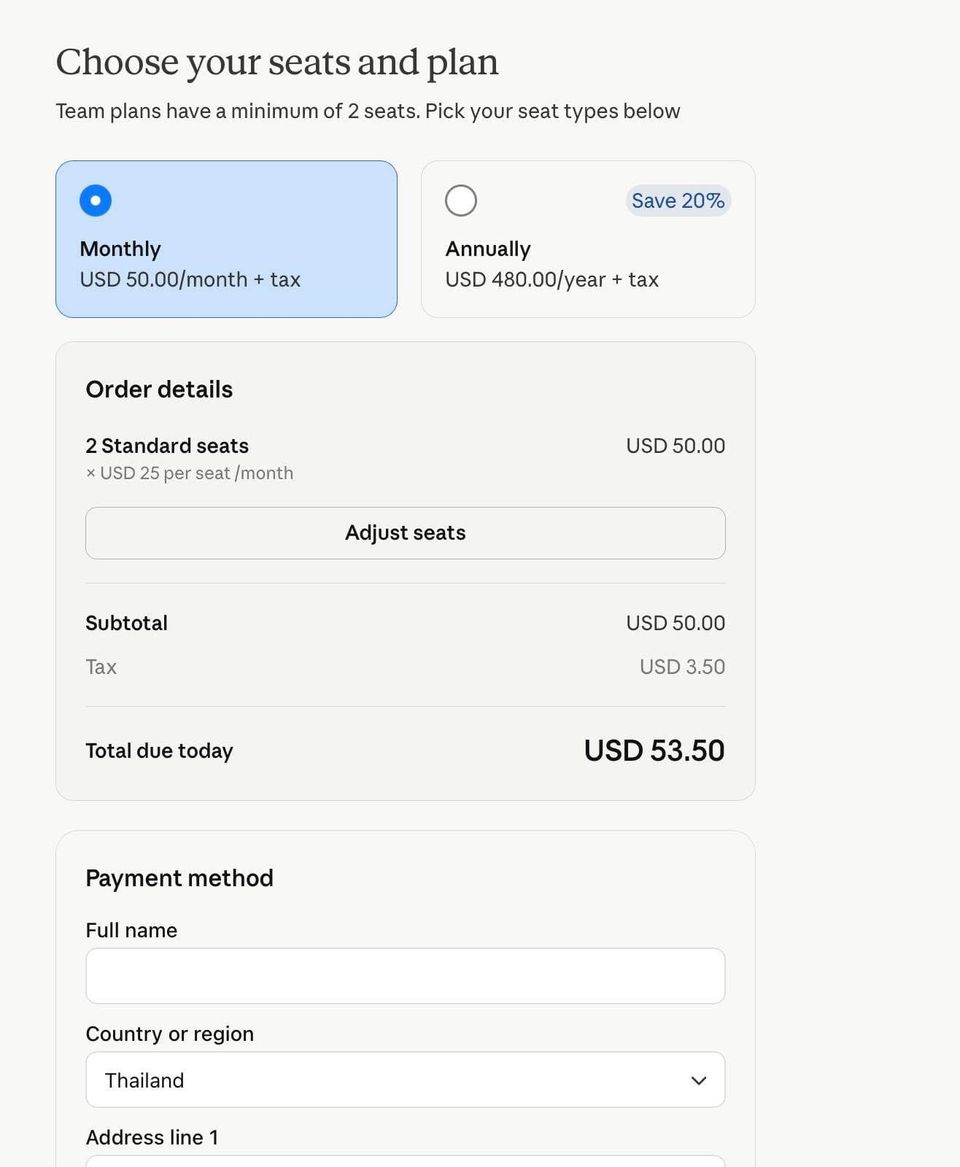
- The first page before signup still says 5 seats, but on the next page, where the total is calculated, it's down to just 2.
- You need an email on a custom domain to sign up.
- In Organization Settings, you can add the email domains you want to invite to your team yourself (but I tried adding gmail and it didn't work 😭 — if anyone has managed it, please share 🙏).

- If you've used that email for Claude before, you can keep both Team <-> Personal and switch between them.

- If you have another account under a different email, nothing can be merged. For example, I signed up for Pro with my gmail. Now that Team has been added, I have to log out of one and log in to the other, switching back and forth — they can't be combined (if anyone knows a way, please tell me 🙏).
- I normally use the desktop app together with Claude in Chrome… I found that if you want them to work together — for example, Cowork using Claude in Chrome for you — you have to be logged in with the same account in both places (one more hassle 🥲).
- The Cyber Verification Program that was approved on my Pro account doesn't apply to Team. You have to request it separately.
- My "hypothesis" is that account age affects Cyber Verification Program approval, because I submitted exactly the same request as before and got rejected very quickly (felt like an auto-reject).
How to migrate chats from the old account to the new one:
-
Settings > Privacy > Export Data — you'll get all your files, but they'll be a mess.

-
Have Claude organize the files: build an index and sort everything into folders for easy use. At this step, I showed it how I usually organize my folders (screenshots) and had it follow that.

-
I have Cowork act as my retriever — "find me the chats related to this topic" — and it digs them up (more convenient than pressing search in Obsidian, because it doesn't just match keywords).
-
You end up with the files on your own machine, and when you want Chat in the new account to read something, you pick the relevant files and hand them over (still a bit manual).
From a post originally published on 1 July 2026.